Which version of Hushmail is right for you?
Choose the approach that fits your workflow. Both options let you send secure messages and forms while supporting your HIPAA compliance.
Keep your email provider
- Keep using your current email for everyday communication
- Sign in to Hushmail when sending sensitive messages
- No technical setup required
⭐️ Best for: Using your existing email day to day, and Hushmail for sensitive messages and forms
Replace your email provider
- Replace your current email provider (Use Hushmail as your main inbox)
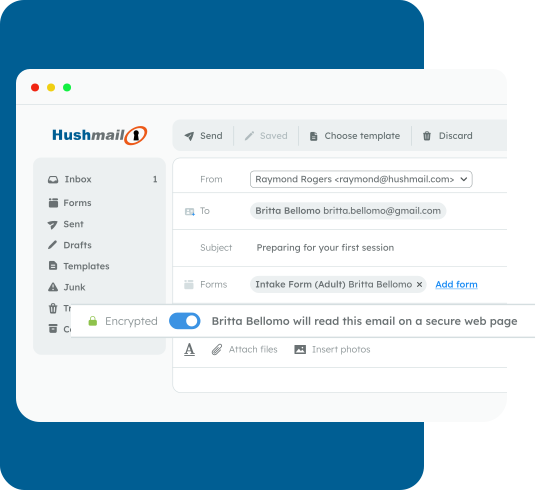
- Turn on encryption sending sensitive messages
- Email tools like folders, scheduling, templates, and send later
⭐️ Best for: Managing all your email day to day in Hushmail, including secure messages and forms
Use Hushmail when you need to send something sensitive
Sign in to Hushmail and send your message from there.
Your client receives an email with a secure link to read, reply, and complete forms in a secure web page.
Continue the conversation securely inside Hushmail.
Keep using your regular email for everything else.
👉 Your clients don't need a Hushmail account. They can access everything through the secure link.
Use Hushmail for all your email communication
With secure email, Hushmail becomes your main inbox.
You send and receive messages just like you would with any email provider. When you need to send sensitive information, you can turn on encryption to protect your message.
When encryption is on, your client receives a link to read and reply in a secure web page.
You can organize your inbox with folders, save time with email templates, and schedule messages to send later.
👉 Your clients don't need a Hushmail account. They can access everything through the secure link.
Not sure which one to choose?
Most healthcare professionals choose based on how they want to use email day-to-day.
👉 Choose Secure Messaging if:
- You want to keep using your current email address
- You only want to sign in to Hushmail when sending sensitive messages
- You want the simplest setup, with no technical steps
- You want a focused tool for secure messages and forms
👉 Choose Secure Email if:
- You're ready to replace your current email provider
- You want to use Hushmail as your main inbox
- You need full email features like folders, forwarding, and templates
- You want secure messages and forms built into your email
See the difference at a glance
👉 Both options support secure messages and forms.

